
Hello, AWS Amplify!
Hi, I’m Jae Wook Kim. Today’s topic is hosting a Jekyll site with AWS Amplify.
This post is written for those who have at least some hands-on experience creating cloud resources via CLI.
This blog is a static site built on Jekyll and currently hosted on GitHub Pages. In this post, we’ll walk through deploying it to AWS Amplify instead.
Before we begin, make sure you have the following ready:
- AWS CLI configured
- A GitHub account with a Jekyll codebase
- An OAuthToken is required so Amplify can access your repository.
Note: This guide creates billable AWS resources. If you’re just following along for learning purposes, make sure to delete the resources afterwards. You can always recreate them using the same template.
Creating a GitHub OAuth Token
A GitHub OAuthToken is required during the deployment process.
When Amplify is set up, it creates a Deploy Key on GitHub to inherit the necessary permissions for deployment. To create that Deploy Key, a Personal Access Token is needed.
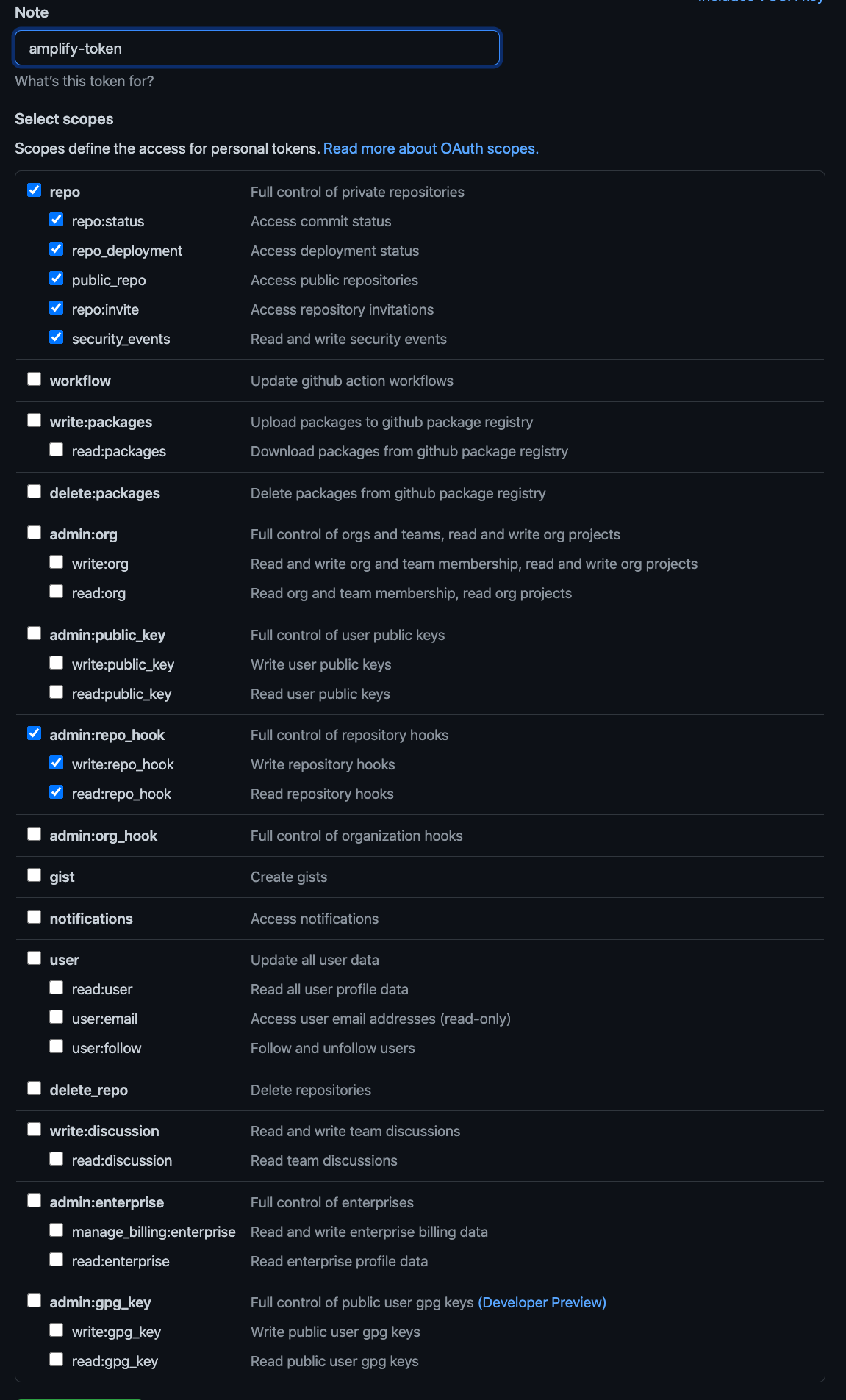
To create a Personal Access Token: log in to GitHub, then click the link or navigate via your profile icon in the top right → Settings → Developer Settings → Personal Access Tokens → Generate New Token. Add a note and grant the permissions shown in the image below.
The generated token is only shown once — make sure to save it! If you missed it, delete the token and generate a new one.
Deploying AWS Resources
Copy the YAML file below, save it locally as amplify_infra.yaml, and deploy it via CLI.
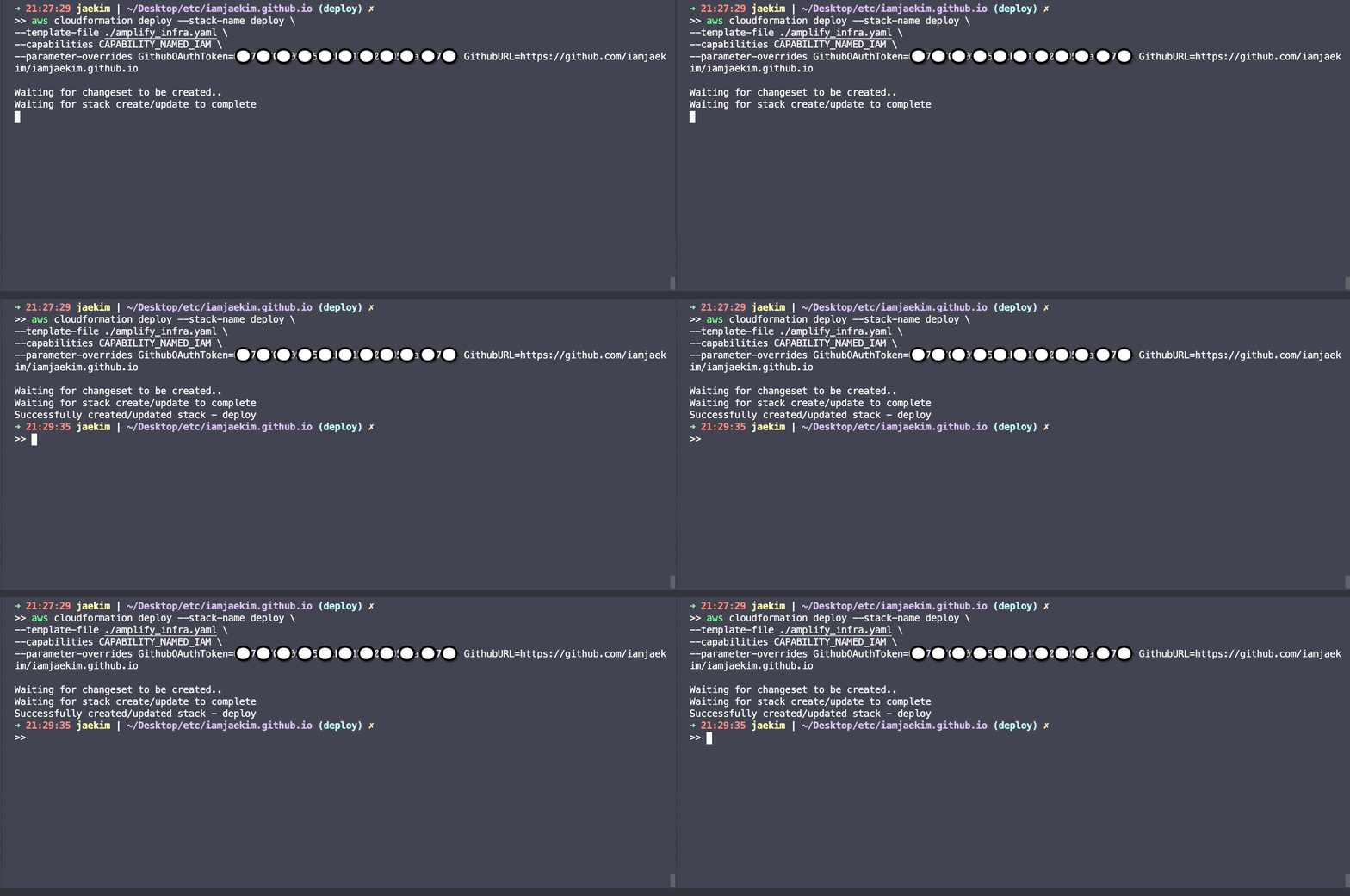
You can monitor the entire deployment process via CLI or through the AWS Console.
The CloudFormation template creates 3 resources:
- IAM Role (no charge)
- A service role attached to the Amplify app.
- Amplify App (billable)
- Contains all Amplify configuration. See the CloudFormation docs for details.
- The
BuildSpecsection defines the build order:- Pre-build: Install dependencies listed in Gemfile
- Build: Build the Jekyll site
- Artifacts: Output directory after build
- Cache: Caches the pre-build/build steps to reduce build time (and billing)
- Amplify Branch (no charge)
- Configures which GitHub branch to pull from. Doesn’t have to be
main— multi-branch setups are supported.
- Configures which GitHub branch to pull from. Doesn’t have to be
# Deploy CloudFormation stack (~3-5 minutes)
aws cloudformation deploy \
  --stack-name deploy \
  --template-file ./amplify_infra.yaml \
  --capabilities CAPABILITY_NAMED_IAM \
  --parameter-overrides \
    GithubOAuthToken=YOUR_GITHUB_TOKEN \
    GithubURL=YOUR_GITHUB_URL
# Required YAML file — save as amplify_infra.yaml
AWSTemplateFormatVersion: 2010-09-09

Parameters:
  GithubOAuthToken:
    Type: String
    Description: Provide Github OAuth Token
    NoEcho: true
  GithubURL:
    Type: String
    Description: Provide Github URL

Resources:
  AmplifyRole:
      Type: AWS::IAM::Role
      Properties:
      AssumeRolePolicyDocument:
          Version: 2012-10-17
          Statement:
          - Effect: Allow
              Principal:
              Service:
                  - amplify.amazonaws.com
              Action:
              - sts:AssumeRole
      Policies:
          - PolicyName: Amplify
          PolicyDocument:
              Version: 2012-10-17
              Statement:
              - Effect: Allow
                  Action: "amplify:*"
                  Resource: "*"
  AmplifyApp:
      Type: "AWS::Amplify::App"
      Properties:
      Name: Blog
      Repository: !REF GithubURL
      AccessToken: !REF GithubOAuthToken
      BuildSpec: |-
          version: 0.1
          frontend:
          phases:
              preBuild:
              commands:
                  - bundle config set --local path 'vendor/bundle' && bundle install
              build:
              commands:
                  - JEKYLL_ENV=production bundle exec jekyll build
          artifacts:
              baseDirectory: _site
              files:
              - '**/*'
          cache:
              paths:
              - 'vendor/**/*'
      Tags:
          - Key: Name
          Value: Jekyll
      IAMServiceRole: !GetAtt AmplifyRole.Arn
  AmplifyBranch:
      Type: AWS::Amplify::Branch
      Properties:
      BranchName: main
      AppId: !GetAtt AmplifyApp.AppId
      Description: main Branch
      EnableAutoBuild: true
      Tags:
          - Key: Name
          Value: Jekyll
Outputs:
  DefaultDomain:
    Value: !GetAtt AmplifyApp.DefaultDomain
Accessing the Amplify App
Amplify generates a URL for your deployed app. This URL is exposed as a stack output and can be queried with the CLI below, or found in the AWS Console under the AWS Amplify section.
aws cloudformation describe-stacks --stack-name deploy --query 'Stacks[*].Outputs[*].OutputValue'
Deleting AWS Resources
As mentioned earlier, AWS Amplify is a billable service. If this was just for learning, you no longer need it, or you’d simply like to clean up — you can delete all the resources at once with the CLI below.
## Delete CloudFormation stack
aws cloudformation delete-stack --stack-name deploy
Thank you for reading to the end! If you have any questions, feel free to reach out via email, LinkedIn, or open a GitHub issue — I’ll do my best to help!
Have a great day!
Comments